Which of my 90 AI sessions needs me?
October 2026
I run a lot of AI coding sessions at once. On a typical day there are dozens of Claude Code sessions open across tmux windows. While building this tool I had about ninety. Some were working, some were waiting on me for a decision, and some had finished an hour earlier and I'd never looked back at them.
Cycling through windows to find the one that needed me got old. Fast.
I tried herdr, a terminal workspace built for running AI agents, and its agent list was exactly what I was missing — one place that showed which agents were working, which were waiting, and which were done. But I live in tmux. My window names, my key bindings, and my muscle memory are all there. So I built the same idea as a tmux plugin.
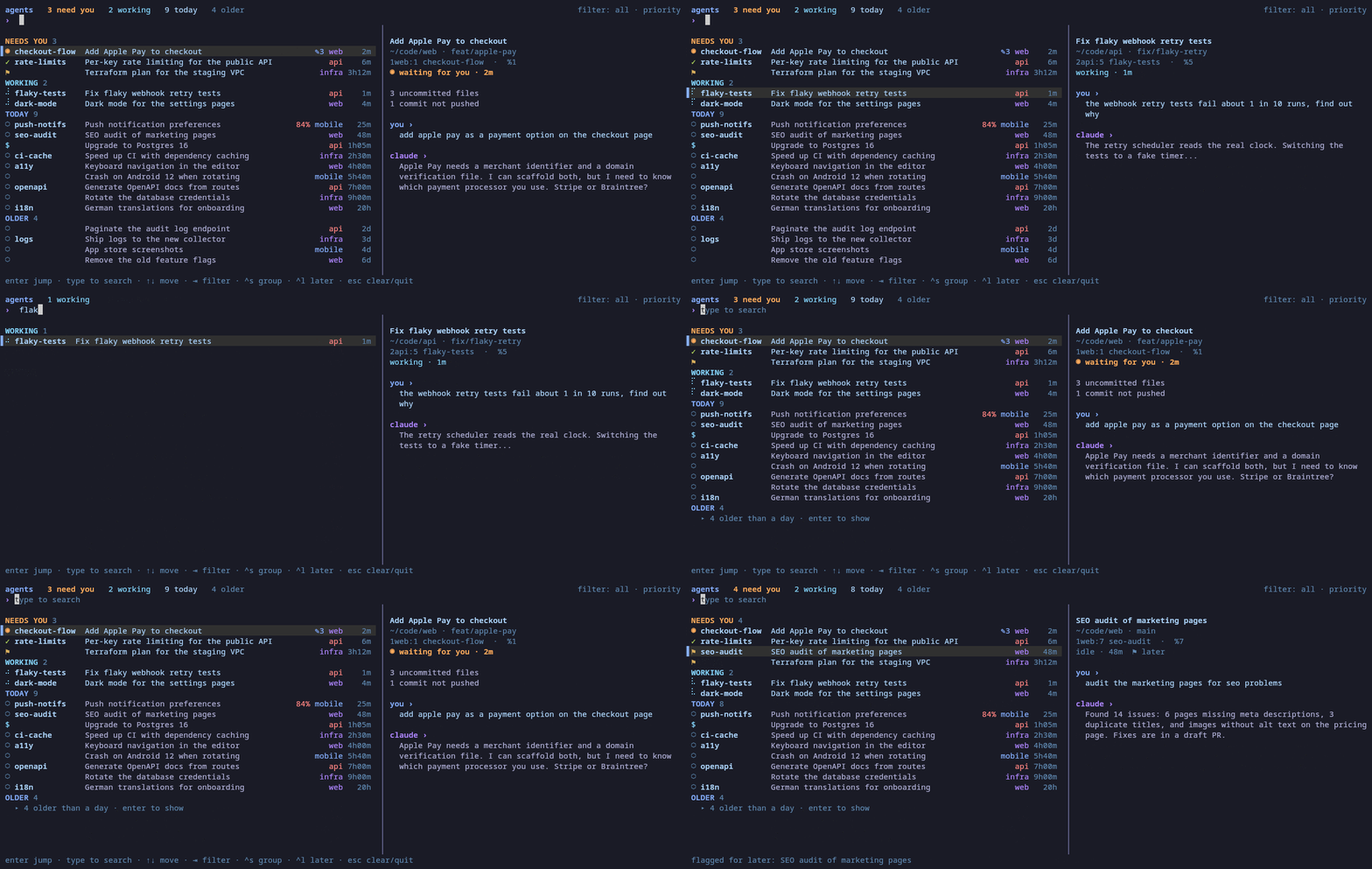
The demo above is tmux-ai-nav demo, which fakes four projects for the recording. The real picker also shows Codex CLI sessions; the demo data only has Claude ones.
What it does
tmux-ai-navigator is a picker for the AI coding agents in your tmux panes. Press prefix a and you get every Claude Code and Codex session, grouped by what needs you:
- Needs you. Sessions waiting for an answer, sessions that finished since you last looked at their pane, and sessions you flagged for later.
- Working. Sessions in the middle of a turn.
- Today and older. Everything else.
Each row shows the tmux window name — I name my windows carefully, so that's the first column — then the session title, the project, and how long it's been in that state. A preview shows the last thing you asked and the last thing the agent said. Type to search. Tab cycles filters. ctrl-s groups by project. Enter jumps to the pane.
Mark as unread, for agents
One feature I wanted from the start: when I check on a session and I'm not ready to deal with it, prefix u flags it for later. It stays in Needs you until I prompt it again. Same mental model as marking an email unread, same two-key cost.
"Done since you last looked"
tmux has hooks for when a pane goes on and off screen. The plugin uses those to remember the last time each pane was visible. A session counts as "done" if it went idle after real work, after that moment. Looking at it clears it.
The reason that's useful: when a session finishes in the background, it doesn't light up anything in your terminal. In a stack of ninety, that means forgetting it exists. The "done since you last looked" bucket is where those sessions surface for me, right alongside the ones that are actively waiting.
Notifications
A small watcher runs in the background and notifies me when a session finishes or starts waiting, unless I'm already looking at that pane. The channels:
- tmux status message
- desktop notification (
notify-sendon Linux,osascripton macOS) - terminal notification (OSC 777)
- bell
- any command you want — a phone push via ntfy is one line
The default chime is deliberately soft. I added that after the desktop's default notification sound turned out to be too sharp for something firing all day. There's a volume setting too.
Bring your own information
Every workflow tracks something different per session: notes, tickets, git state, how full the context window is. Rather than build all of that in, the plugin runs an "extras" command you choose. It gets the list of sessions as JSON and returns a badge, a title, preview lines, or search text per session.
I use it to show my session notes and warn when a session's context is nearly full. The repo ships an example that shows git status.
Codex support, and a surprise
Adding Codex CLI looked like a straight port. Codex has hooks, so record each session's status from them. I built it that way, tested across two Codex windows, and watched the output tell me something I did not expect.
Codex runs every TUI's conversations through one shared background app-server. The hooks all run there — even carrying the first TUI's TMUX_PANE in their environment. So hooks genuinely can't tell which pane a conversation is in. No amount of digging around the environment solves it; the information isn't there to recover.
What does work is already sitting in plain sight. The Codex TUI keeps the terminal title current: a braille spinner while it's working, [ ! ] Action Required | … when it's waiting for an approval, the plain name when it's idle. tmux exposes every pane's title as #{pane_title}. So the navigator reads status straight from there, and matches the conversation in Codex's own read-only thread database by name, by codex resume <id>, or by folder and start time.
The upshot: Codex support needs no setup. No hooks. If Codex is running in a pane, it shows up.
tmux versions have opinions
Half of the work on this wasn't the picker. It was tmux itself.
- tmux 3.2+ escapes control characters in
-Foutput, which broke a\x1ffield separator I was using. display-popupdoesn't expand formats in its command string.- tmux 3.2 rejects
display -p -c. - tmux 3.4 prints
$in option values as\$. - Popups only exist on 3.2+, so on 3.0/3.1 the picker opens in a temporary window instead.
The plugin is tested against tmux 3.0a, 3.2a, 3.3a, 3.4, and 3.5a on Ubuntu and macOS in CI. Most of the lines-of-code added over the last week are workarounds for one of the above.
Install
With TPM:
set -g @plugin 'ferrants/tmux-ai-navigator'
Press prefix I to install, then prefix a to open it. Linux or macOS, tmux 3.0+, Python 3.8+ with the standard library only — no pip install, no runtime dependencies.
Want to see it before committing to the key binding?
bin/tmux-ai-nav demo
Notifications with the soft chime:
set -g @ainav-notify 'tmux,system'
set -g @ainav-notify-sound 'soft'
set -g @ainav-notify-volume '50'
A polite note: the plugin won't claim prefix a or prefix u if you've already bound them (many configs use prefix a for send-prefix). It tells you so in the status line instead.
How it was built
I built this in a Claude Code session with Codex CLI reviewing the plan before I started and every commit after (codex review). The split worked well: Claude for the implementation turn, Codex as the second pair of eyes on the diff. A lot of the subtle bugs — the tmux-version quirks above, the Codex-hooks dead end — were things one of the two models flagged after the other produced them.
Grab it
MIT licensed, public on GitHub:
github.com/ferrants/tmux-ai-navigator
Issues and ideas welcome, especially support for other agents. If you run a lot of AI sessions and want to try it, I'd love to hear which bucket surfaces the sessions you were about to forget.